
RawDump Free Download for Windows – GameCube Ripper
What is RawDump Free Download for Windows – GameCube Ripper?
The RawDump free download gives you a specialized, open-source tool to rip GameCube and Wii discs into ISO images on Windows. Moreover, it reads these console discs using raw-mode commands that normal DVD software cannot handle. Because standard drives cannot read Nintendo's disc format, RawDump fills a real gap for game preservation. Therefore, it is ideal for backing up discs you legally own or loading them into an emulator. Small and free, RawDump does one job and does it well.
RawDump works by using special vendor commands on certain compatible DVD drives to read the disc raw. As a result, it unscrambles the data on the fly and produces a clean ISO ready for use. In addition, it includes a verification step that checks your dump against the disc's own checksums. For converting or shrinking other video discs, check out VidCoder which rips and encodes DVDs and Blu-rays with ease.
After testing it with a compatible LG drive, a GameCube disc dumped into a working ISO that loaded straight into Dolphin. Furthermore, the verification step confirmed the read was clean on the first try. The RawDump free download is best suited to emulation fans and disc preservationists. According to Wikipedia, the GameCube uses a special mini-DVD format that standard drives cannot read.
Why Use This Software?
- The RawDump free download reads discs that normal software cannot.
- Moreover, it preserves your GameCube and Wii games as clean ISOs.
- In addition, on-the-fly unscrambling produces ready-to-use images.
- Furthermore, the verification step confirms your dump is accurate.
- Also, the images load straight into the Dolphin emulator.
- Besides, its simple one-click flow keeps the process easy.
- Finally, it is free, open source, and built for game preservation.
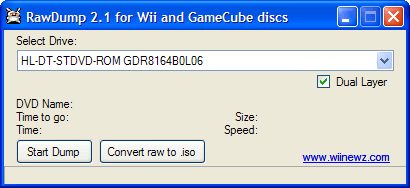
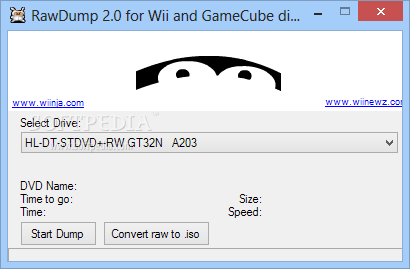
Screenshots
Key Features
- 💿 GameCube and Wii Dumping – Rips both console disc formats to ISO.
- 🔓 Raw-Mode Reading – Uses vendor commands to read protected discs.
- 🧩 On-the-Fly Unscrambling – Turns scrambled raw data into clean ISOs.
- ✅ Dump Verification – Checks the read against the disc's own checksums.
- 📀 Dual-Layer Support – Adds experimental support for dual-layer Wii discs.
- 🎮 Dolphin Ready – Creates images that load directly into Dolphin.
- 🖱 One-Click Operation – Select a drive, pick a path, and start dumping.
- 📊 Live Info Display – Shows disc name, size, speed, and time left.
- 🪶 Lightweight Tool – Tiny download with no heavy install needed.
- 🆓 Free and Open Source – A free preservation tool with no cost at all.
How to Install
- Download the RawDump archive from the link below.
- Extract the files to a folder on your PC.
- Connect a compatible LG or Hitachi-LG DVD drive.
- Run RawDump and insert your GameCube or Wii disc.
- Select the drive, choose an output path, and start.
- Also try X Minecraft Launcher to manage modded Minecraft alongside your emulation setup.
System Requirements
| OS | Windows XP, 7, 8, 10, and 11 |
| CPU | Any Intel or AMD Processor |
| RAM | 512 MB minimum |
| Storage | Space for large ISO files |
| Drive | Compatible LG or Hitachi-LG DVD drive |
| Note | Only works with specific drive models |
Pros and Cons
Pros
- Completely free and open source
- Rips GameCube and Wii discs
- On-the-fly unscrambling
- Built-in dump verification
- Creates Dolphin-ready ISOs
- Simple one-click workflow
- Live progress information
- Tiny, lightweight download
- Great for preservation
- Handles NR discs with a swap
Cons
- Only works with specific drives
- Compatible drives are old and rare
- Interface is very basic
- Dual-layer support is experimental
- No library or metadata features
- May need compatibility mode
- Stubborn discs need multiple tries
- Windows only
- No playback of its own
- Steep hardware requirement
Power Tips
Conclusion
The RawDump free download is a niche but powerful tool for ripping GameCube and Wii discs into ISO images on Windows. It uses raw-mode reading on compatible drives to unlock a disc format that ordinary software simply cannot touch. Moreover, its on-the-fly unscrambling and verification step make it a trusted choice for game preservation and emulation.
In real-world use, RawDump is best suited to emulation enthusiasts and collectors who want clean backups of discs they own. While it only works with specific older DVD drives and has a very basic interface, its unique ability is hard to replace. Therefore, if you preserve Nintendo discs, the RawDump free download is an essential tool for your Windows PC.


Comments (0)