
ASIO4ALL Free Download for Windows – ASIO Driver
What is ASIO4ALL Free Download for Windows – ASIO Driver?
The ASIO4ALL free download gives you a hardware independent low latency ASIO driver for WDM audio devices on Windows. Created by German programmer Michael Tippach in 2003, it began as a bedroom project to get ASIO support for the AC97 chip on his laptop and grew into the standard driver for musicians recording without professional gear. ASIO, which stands for Audio Stream Input/Output, is a sound card driver protocol specified by Steinberg Media Technologies, and this tool brings it to hardware that never shipped with it.
ASIO4ALL works through WDM Kernel-Streaming and acts as a bridge between software and audio hardware. Your DAW gets to bypass Windows default audio mixers, so buffer sizes shrink and latency drops to levels normally reserved for a dedicated audio interface. The driver runs alongside existing sound card drivers without replacing them, installs no kernel mode components, and can be removed without causing headaches. For adjusting your display while you record, check out Monitorian which controls brightness for multiple monitors.
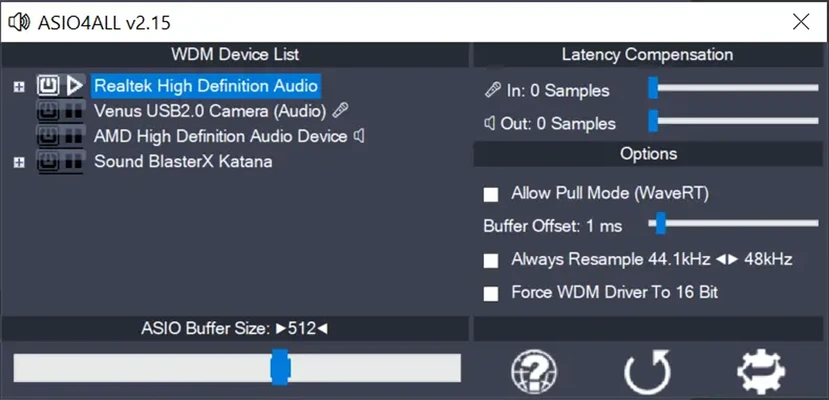
After testing it on a Windows 11 laptop with a stock Realtek chip, monitoring delay in the DAW fell from a distracting echo to near-instant response. The control panel lists every audio device on the system — speakers, headphones, microphones — and lets you enable and combine them freely. According to Wikipedia, the driver supports WDM audio devices on every Windows version since 98SE.
Why Use This Software?
- Records with low latency on built-in sound cards, no audio interface required.
- Bypasses the Windows mixer for faster, more reliable audio output.
- Runs beside your existing drivers without touching or replacing them.
- Combines several inputs and outputs into a single ASIO device.
- Gives fine control over buffers, resampling, and latency compensation.
- Installs and uninstalls cleanly, so trying it carries zero risk.
- Democratizes professional audio production for aspiring musicians and producers.
Screenshots
Key Features
- 🎛️ Universal ASIO Driver – Works with almost any WDM-compatible sound card.
- ⚡ Low Latency – Delivers latencies below most factory-issued sound drivers.
- 🔀 Device Aggregation – Combines multiple WDM devices into one virtual ASIO device.
- 🎚️ Latency Compensation – Offsets input and output delay in milliseconds.
- 🔧 Buffer Controls – Adjusts ASIO buffer size and WaveRT buffer offset.
- 🔄 Resampling Override – Forces 44 kHz to 48 kHz conversion when needed.
- 🎵 16-bit Mode – Switches the WDM driver to 16-bit for stubborn hardware.
- 🖥️ Wide OS Support – Runs on everything from Windows 98SE to Windows 11.
- 📖 Bundled Manual – Places a detailed PDF Instruction Manual on your desktop.
- 🆓 Freeware – Free for end users; only commercial resale is restricted.
How to Install
- Download the ASIO4ALL installer from the link below.
- Run the setup wizard and follow the instructions presented onscreen.
- Open your DAW and go to its audio preferences.
- Select the program as your preferred driver in the device list.
- Click the tray icon to open the control panel and enable your sound card.
- Set the buffer size, test playback, and start recording.
- Also try WinDirStat to free up disk space for your audio projects.
System Requirements
| OS | Windows 98SE through Windows 11 (32/64-bit) |
| CPU | Any Intel or AMD Processor |
| RAM | 512 MB minimum |
| Storage | A few megabytes of free disk space |
| Audio | Any WDM-compatible audio device |
| Note | Needs exclusive access to the audio driver while active |
Pros and Cons
Pros
- Freeware for all end users
- Works with built-in sound cards
- Latencies below stock drivers
- Runs alongside existing drivers
- Clean install and uninstall
- Combines multiple audio devices
- Detailed PDF manual included
- Supports Windows 98SE to 11
- Tiny download and footprint
- Trusted standard since 2003
Cons
- Requires exclusive audio driver access
- Occasional crashes need a restart
- Lacks usage tutorials for beginners
- Not all WDM hardware is compatible
- No guarantee of improved performance
- Blocks other apps from audio while active
- Interface looks dated
- Advanced options confuse new users
- Some tweaking and trial and error needed
- No official support channel
Power Tips
Top Alternatives
- WASAPI Exclusive Mode – built into Windows 10 and 11, it offers low-latency output in many DAWs without installing anything, though it lacks ASIO4ALL's device aggregation.
- FL Studio ASIO – bundled with FL Studio, this driver delivers similar low-latency performance but only works inside FL Studio itself.
- Ocenaudio – not a driver but a free audio editor that pairs well with ASIO4ALL for recording and editing on the same machine.
Frequently Asked Questions
Yes, it installs no kernel mode components and runs alongside your existing sound card drivers without replacing or modifying them.
Yes, it is completely free for end users; only commercial resale and bundling are restricted by the developer.
Yes, it runs on every Windows version from 98SE through Windows 11, in both 32-bit and 64-bit editions.
No, dedicated audio interfaces ship with their own native ASIO drivers, which usually perform better than a generic solution.
The driver needs exclusive access to your audio device, so close browsers and media players, then re-select your sound card in the control panel.
Conclusion
The ASIO4ALL free download solves a real problem for home producers: studio-grade latency without studio-grade hardware. It turns any built-in sound chip into a usable recording device, works across every Windows version still in circulation, and costs nothing. The clean uninstall means there is no risk in simply trying it on your setup.
The trade-offs are exclusive driver access, occasional instability, and a learning curve around buffers and resampling. For anyone recording music on a standard PC or laptop, though, the ASIO4ALL free download remains the first tool worth installing before spending money on an audio interface.








Comments (0)