
Monitorian Free Download for Windows – Brightness
What is Monitorian Free Download for Windows – Brightness?
The Monitorian free download gives you a simple tool to adjust the brightness of multiple monitors right from the system tray. Moreover, it controls both internal laptop screens and external DDC/CI monitors in one place. Because Windows lacks easy brightness control for external displays, this tool fills a real gap. Therefore, it suits anyone with a multi-monitor desk or docking setup. Built by developer emoacht, Monitorian stays lightweight, open source, and free.
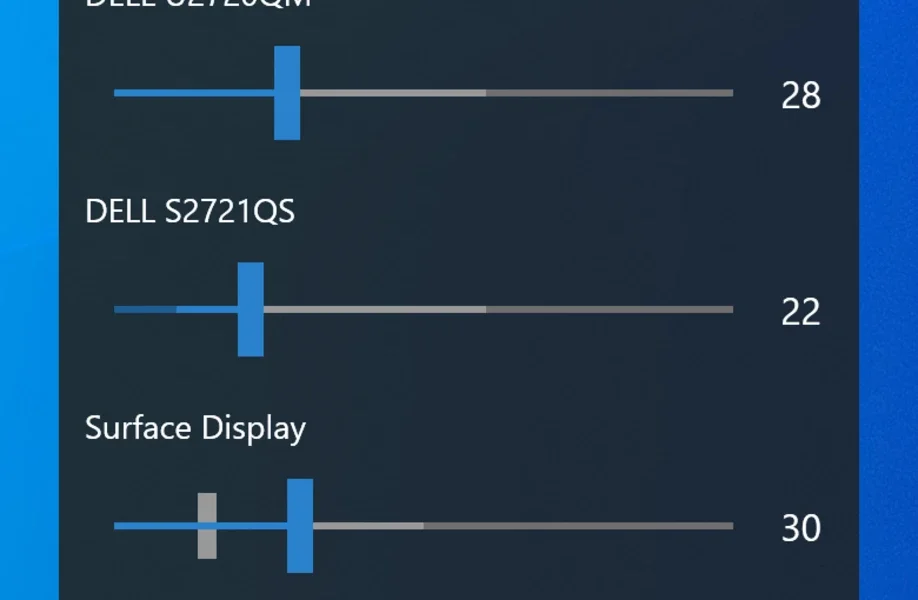
Monitorian works by sending DDC/CI commands to each connected monitor to change brightness. As a result, you get clean sliders for every display without touching hardware buttons. In addition, you can move all monitors in unison or adjust each one on its own. For disk cleanup on the same PC, check out WinDirStat which shows exactly where your storage goes.
After testing it on a dual-monitor setup, both screens dimmed together with a single slide. Furthermore, the tray access made quick tweaks effortless during the day. The Monitorian free download is best suited to anyone who switches between bright and dark rooms. According to Wikipedia, DDC/CI is the standard that lets software control monitor settings like brightness.
Why Use This Software?
- The Monitorian free download controls external monitor brightness with ease.
- Moreover, it saves you from fiddling with clunky monitor buttons.
- In addition, unison mode dims every screen together in one move.
- Furthermore, hotkeys let you change brightness without opening anything.
- Also, the tray access keeps it out of the way until you need it.
- Besides, command-line support automates brightness for different times.
- Finally, it is free, open source, and very light on resources.
Screenshots
Key Features
- 🌞 Multi-Monitor Control – Adjusts brightness for all your displays at once.
- 🖥 External Monitor Support – Controls DDC/CI monitors, not just laptops.
- 🎚 Individual or Unison – Changes each screen alone or all together.
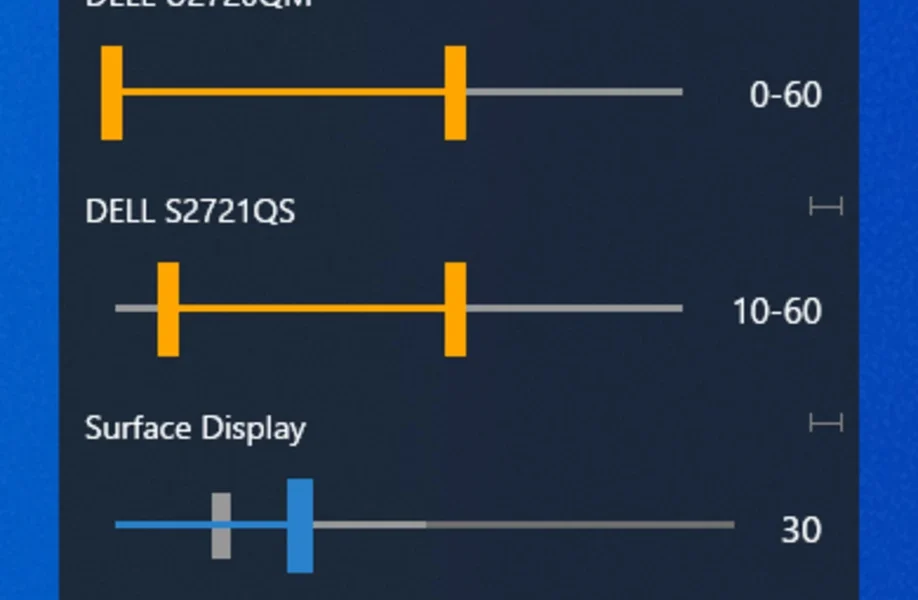
- 🌗 Contrast Adjustment – Switches sliders from brightness to contrast easily.
- ⌨️ Hotkey Support – Sets keyboard shortcuts for quick brightness changes.
- 👆 Touchpad Gesture – Swipes two fingers to adjust on precision touchpads.
- 🔧 Custom Range – Sets the adjustable brightness range per monitor.
- 💻 Command-Line Options – Automates brightness through scripts and tasks.
- 🚀 Start on Sign In – Launches automatically and sits in the tray.
- 🆓 Free and Open Source – No cost, with source code on GitHub.
How to Install
- Download the Monitorian installer from the link below.
- Run the setup file or use the portable version.
- Enable DDC/CI in your external monitor's menu.
- Launch Monitorian and open it from the tray.
- Drag the sliders to adjust each monitor's brightness.
- Also try UCheck to update all your installed software in one click.
System Requirements
| OS | Windows 10 (1607) and 11 |
| CPU | Any Intel or AMD Processor |
| RAM | 512 MB minimum |
| Storage | 20 MB free disk space |
| Framework | .NET Framework 4.8 |
| Monitor | DDC/CI enabled external display |
Pros and Cons
Pros
- Free and open source
- Controls external monitors
- Simple tray-based sliders
- Unison and individual modes
- Hotkey and touchpad support
- Contrast control included
- Command-line automation
- Very lightweight
- Start on sign in option
- Clean, clutter-free interface
Cons
- External monitors need DDC/CI
- Some monitors ignore DDC/CI
- Shows up to 4 monitors at once
- Add-on features need subscription
- No brightness scheduling built in
- Depends on monitor hardware
- Not for gamma or color calibration
- Reconnecting ports can reset monitors
- Requires .NET Framework
- Basic feature set by design
Power Tips
Conclusion
The Monitorian free download is a handy little tool that solves a real Windows gap: controlling external monitor brightness. It puts clean sliders in your system tray and lets you adjust every display alone or together. Moreover, hotkeys, touchpad gestures, and command-line options make it flexible for any workflow.
In real-world use, Monitorian is best suited to anyone with multiple monitors who is tired of hunting for hardware buttons. While it depends on DDC/CI support and shows only four monitors at once, its simplicity is hard to beat. Therefore, if you want easy brightness control, the Monitorian free download is a must-have for your Windows PC.






Comments (0)