
VeraCrypt Disk Encryption Free Download for Windows
What is VeraCrypt Disk Encryption Free Download for Windows?
VeraCrypt disk encryption is a free, open-source tool that protects your files, folders, and entire drives on Windows. It creates encrypted volumes that work like normal drives on your PC. No one can access the data inside without the correct password. VeraCrypt is trusted by journalists, businesses, and privacy-conscious users around the world.
VeraCrypt is the successor to TrueCrypt, first released in 2013 by IDRIX. It fixes all known security issues from TrueCrypt and adds stronger encryption algorithms. The latest version is 1.26.29, which adds Argon2id support for password hashing and fixes two security issues. If you also want to protect your PC from malware, RogueKiller is a great free security tool to pair with VeraCrypt.
VeraCrypt disk encryption works with AES, Serpent, Twofish, Camellia, and Kuznyechik algorithms. You can encrypt a single file container, a USB drive, a partition, or your entire Windows system drive. According to Wikipedia, VeraCrypt has been independently audited and is considered one of the most secure open-source encryption tools available today.
Why Use This Software?
- VeraCrypt disk encryption is free and open source — no hidden costs.
- Protects files, USB drives, partitions, and entire system drives.
- Hidden volume feature gives plausible deniability under pressure.
- Independently security audited — trusted by millions worldwide.
- No backdoors, no telemetry, no data sent to any server.
- Works on Windows, macOS, and Linux with the same volumes.
- Hardware-accelerated encryption means no noticeable slowdown.
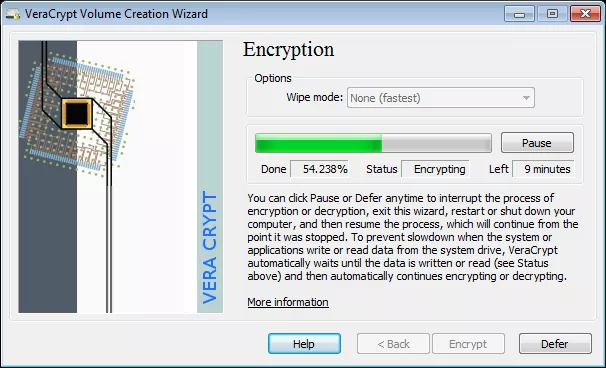
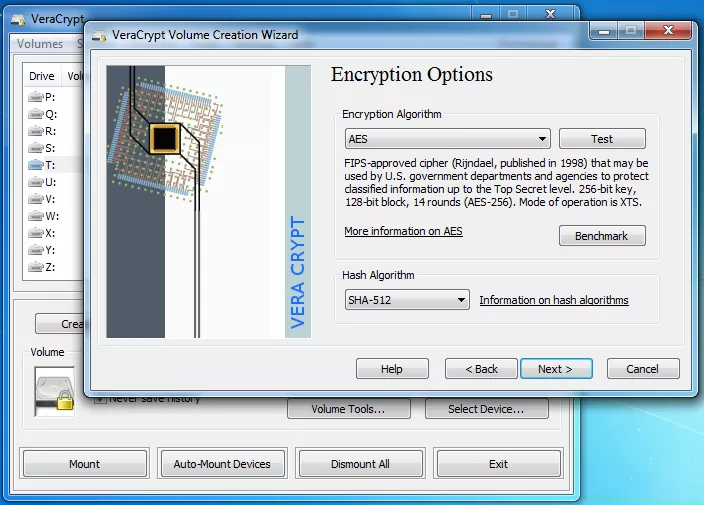
Screenshots
Key Features
- 🔒 AES-256 Encryption – Military-grade AES, Serpent, Twofish, and cascaded encryption for maximum security.
- 📂 Encrypted Containers – Create virtual encrypted disks stored as files and mount them as real drives.
- 💻 Full System Encryption – Encrypt your entire Windows partition with pre-boot authentication.
- 🧠 Hidden Volumes – Create a hidden encrypted volume inside another volume for plausible deniability.
- 🔑 Argon2id Support – Latest version adds Argon2id password hashing for stronger brute-force protection.
- ⚡ Hardware Acceleration – Uses CPU-level AES acceleration for fast encryption and decryption.
- 🔄 TrueCrypt Compatible – Opens and converts TrueCrypt containers and partitions to VeraCrypt format.
- 🌐 Cross Platform – Works on Windows, macOS, and Linux with the same encrypted volumes.
- 🛡️ No Backdoors – Open-source code with no telemetry, no ads, and no hidden access.
- 🆓 Completely Free – Released under Apache License 2.0 with no cost or subscription required.
How to Install
- Download the VeraCrypt installer from the link below.
- Run the setup file and choose Install or Extract for portable mode.
- Launch VeraCrypt and click Create Volume to start the wizard.
- Choose to create an encrypted file container, partition, or system drive.
- Set your encryption algorithm, volume size, and a strong password to finish.
- Also Download ESET NOD32 Antivirus for Windows – Free
System Requirements
| OS | Windows 7, 8, 8.1, 10, 11 (32/64-bit) |
| CPU | Intel or AMD, 1 GHz or faster |
| RAM | 512 MB minimum |
| Storage | 30 MB free disk space |
| Rights | Administrator rights required |
| File Size | ~35 MB |
Pros and Cons
Pros
- Free and open source under Apache License
- Military-grade AES-256 encryption
- Hidden volume for plausible deniability
- No backdoors or telemetry
- Hardware-accelerated encryption
- Cross-platform — Windows, Mac, Linux
- TrueCrypt volume compatibility
- Independently security audited
- Argon2id password hashing in latest version
- Completely free with no subscription
Cons
- Interface is not beginner-friendly
- No cloud storage integration
- System encryption requires careful setup
- Cannot encrypt individual files directly
- Administrator rights always required
- No mobile app available
- Recovery can be complex if password is lost
- No official paid support available
- Setup wizard can confuse new users
- No automatic cloud backup of volumes
Power Tips
Conclusion
VeraCrypt disk encryption is one of the best free security tools available for Windows. It gives you full control over your data with strong, open-source encryption that no one can break without your password. Whether you want to protect a single folder or your entire system drive, VeraCrypt disk encryption gets the job done reliably and safely.
Version 1.26.29 makes it even better with Argon2id support and important security fixes. If you take privacy seriously, VeraCrypt is the tool you need on your Windows PC.







Comments (0)