D3D Enforcer free download is a portable tool for Windows that lets you tweak Direct3D settings for any application. It gives gamers and developers full control over how their apps use Direct3D. You can reduce input lag, lock frame rates, and adjust graphics behavior — all without touching the app’s own settings. D3D Enforcer needs no installation and runs straight from a folder.
The tool works by injecting a DLL into your target application and hooking the required Direct3D APIs. This lets you force custom settings on games and 3D programs. You can also save your settings as profiles for quick use later. For other handy system tools, check out System Information Viewer which shows detailed hardware and GPU info on your PC.
D3D Enforcer supports Direct3D versions 9 through 11. It is lightweight, free, and great for anyone who wants to fine-tune graphics performance. According to Softpedia, the latest version 1.1.2 comes as a portable package with a wide range of Direct3D tweak options.
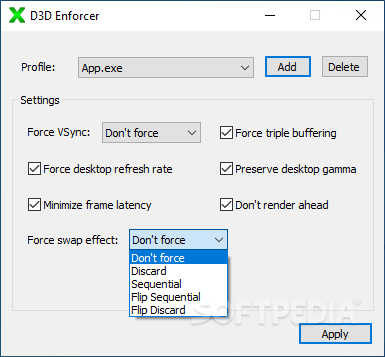
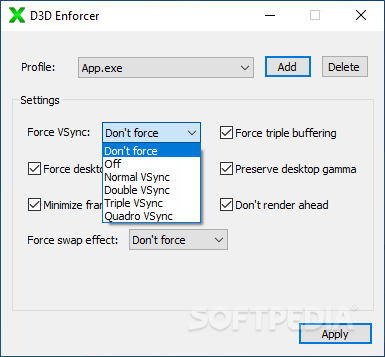
D3D Enforcer Features and Highlights
- 🎮 Direct3D 9 to 11 Support – Tweak settings for a wide range of games and 3D applications.
- 💉 DLL Injection – Injects a DLL into the target app to hook and control Direct3D APIs.
- 💾 Profile System – Save your tweaks as profiles for fast, easy loading next time.
- 🖥️ Force Presentation Interval – Make any app use a specific presentation interval for smoother output.
- 🔄 Two Back Buffers – Force apps to use two back buffers for better frame handling.
- 🎯 Reduce Input Lag – Limit queued frames to one to lower input lag when VSync is on.
- 🔒 Lock Refresh Rate – Stop apps from changing your display refresh rate via Direct3D.
- 🎨 Preserve Desktop Gamma – Prevent apps from overwriting your desktop gamma settings.
- 📦 Portable — No Install – Runs from any folder with no setup or installation needed.
- 🆓 Completely Free – No cost, no ads, and no subscription required to use.
How to Install D3D Enforcer Free Download
- Download the D3D Enforcer ZIP file from the link below.
- Extract the ZIP to any folder on your PC.
- Run the D3D Enforcer executable — no installation needed.
- Add your target application and adjust the Direct3D settings you want.
- Save your settings as a profile for quick use later.
Also Download Steam Library Manager for Windows – Free
Why Use D3D Enforcer?
- D3D Enforcer gives you full control over Direct3D settings for any app.
- Reduce input lag for a smoother, more responsive gaming experience.
- No installation needed — portable and ready to run instantly.
- Save profiles so you never have to redo your tweaks.
- Works with Direct3D 9, 10, and 11 applications.
- Lightweight and free with no hidden costs.
- Great for both casual gamers and professional developers.
D3D Enforcer System Requirements
| Component | Requirement |
|---|---|
| OS | Windows 7, 8, 8.1, 10, 11 |
| CPU | Intel or AMD Processor |
| RAM | 512 MB minimum |
| Storage | 5 MB free disk space |
| Graphics | Direct3D 9 to 11 compatible GPU |
| File Size | ~1 MB |
Power Tips for D3D Enforcer Users
- Create a separate profile for each game so you can switch settings instantly.
- Use the “one queued frame” setting to reduce input lag when VSync is enabled.
- Avoid the “render ahead” and presentation swap options — they can cause stuttering.
- Test one tweak at a time so you know exactly which setting helps your game.
- Keep the tool in its own folder since it is portable and leaves no registry traces.
D3D Enforcer Pros and Cons
| ✅ Pros | ❌ Cons |
|---|---|
| Free and portable — no installation needed | Only works with Direct3D applications |
| Supports Direct3D 9 through 11 | Not for OpenGL or Vulkan games |
| Reduces input lag when VSync is on | Some tweaks may cause stuttering |
| Save and load custom profiles | One queued frame not supported on legacy D3D 9 |
| Lightweight at around 1 MB | No automatic per-game detection |
| Leaves no registry traces | Requires some technical knowledge |
| Locks refresh rate and gamma settings | May increase total CPU usage |
| Works for both gaming and development | Interface is basic and plain |
| No ads, no cost, no subscription | DLL injection may trigger some antivirus alerts |
| Quick to set up and use | No active recent development updates |
Conclusion
D3D Enforcer is a handy free tool for anyone who wants more control over Direct3D settings on Windows. Whether you are a gamer trying to cut input lag or a developer testing 3D apps, D3D Enforcer gives you the tweaks you need in a small, portable package.
It supports Direct3D 9 through 11, saves your settings as profiles, and runs without any installation. If you want to fine-tune your graphics performance for free, D3D Enforcer is well worth a try