
❓ What is NetSpot?
NetSpot is a professional WiFi analyzer and wireless site survey tool developed by Etwok LLC, designed for Windows and macOS. It helps home users, IT professionals, and network engineers analyze WiFi coverage, identify dead zones, troubleshoot connectivity issues, and plan new wireless networks — all from a simple, intuitive interface.
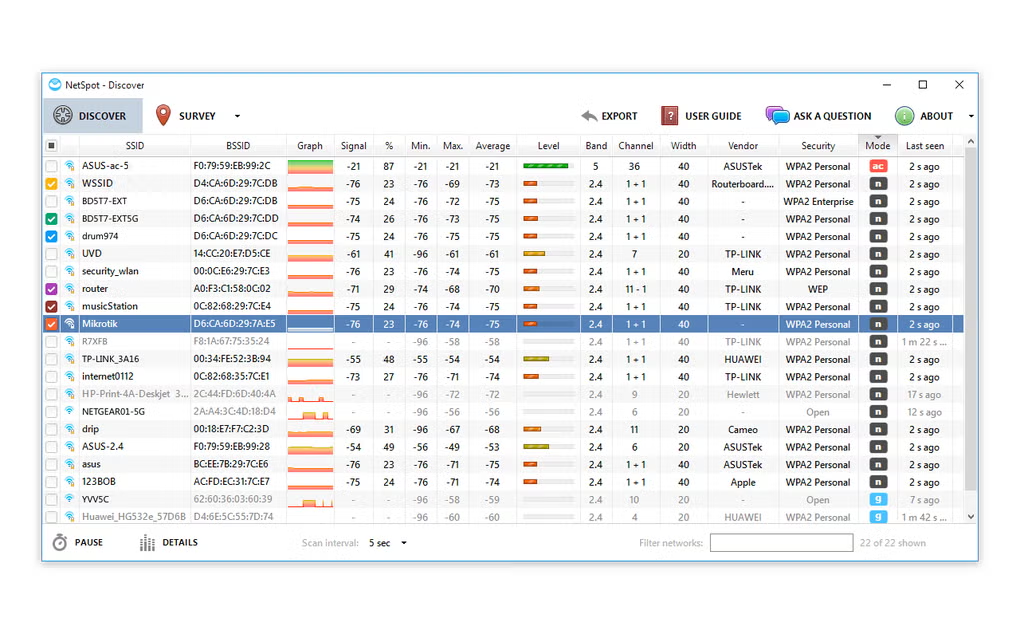
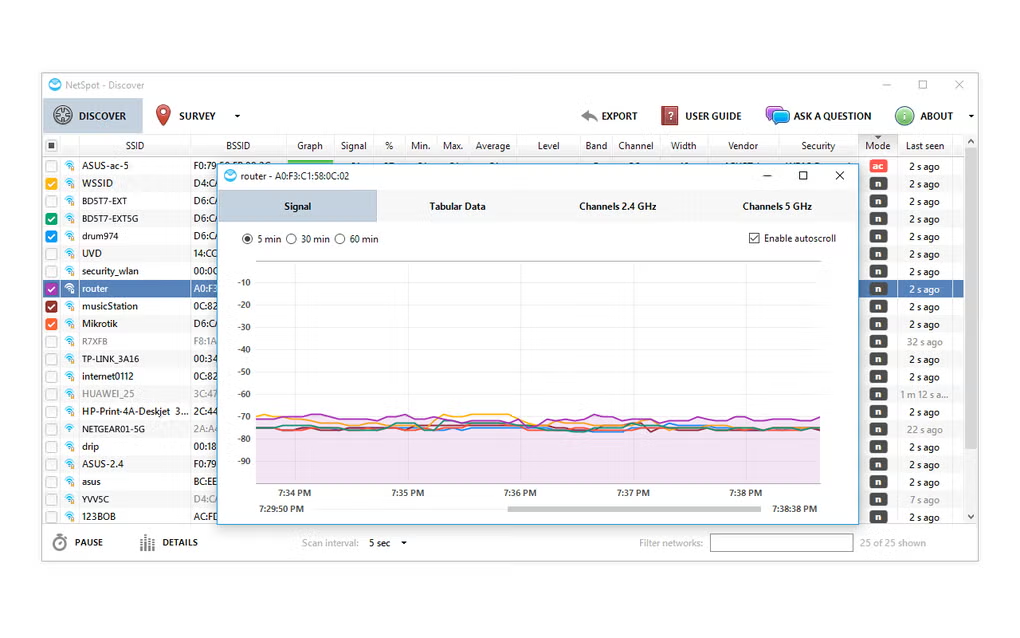
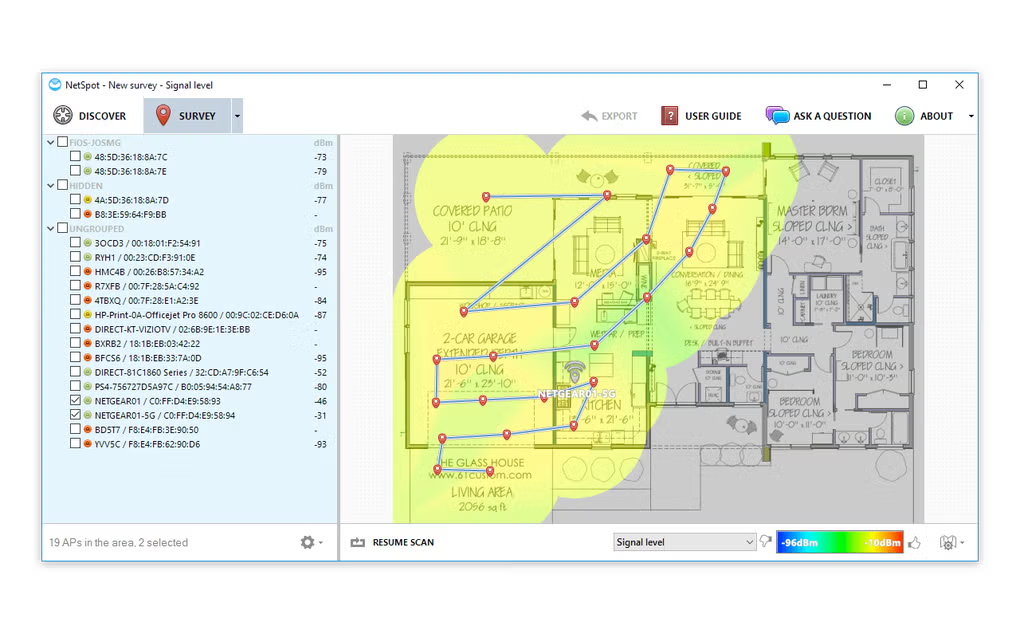
The software works in three primary modes: Discover, Survey, and Planning. Discover mode collects real-time data about all nearby WiFi networks and displays it in an interactive table. Survey mode lets you walk around your space and generate color-coded heatmaps that show exactly where signal is strong or weak. If you work with network tools, you might also find System Information Viewer useful for detailed hardware and network diagnostics.
NetSpot 5.1.0.707 brings several improvements including support for custom router simulation in Predictive Survey projects, PDF floor plan uploads, and enhanced snapshot import/export. According to Wikipedia, NetSpot was first released in 2011 and has become one of the most established WiFi analysis tools available. For users who also manage network security, RogueKiller is a great companion tool for detecting unwanted network threats.
✨ Features and Highlights
- 📡 WiFi Discover Mode – Scans and displays all nearby networks with signal strength, channel, and security details in real time.
- 🗺️ Heatmap Visualization – Generates color-coded signal heatmaps over your floor plan so you can see coverage gaps instantly.
- 📐 Network Planning Mode – Simulate router placement on a floor plan before installing any hardware to optimize coverage.
- 🔍 Passive WiFi Survey – Walk through your space and collect signal data points to create accurate site survey reports.
- 📊 15+ Heatmap Types – View signal level, noise, SNR, channel interference, and more through different visualization layers.
- ⚡ Intelligent AP Detection – Automatically detects and identifies access points, including their channels and signal behavior.
- 📄 Professional Report Export – Generate detailed PDF reports of your WiFi survey for clients or documentation.
- 🔄 Snapshot Import/Export – Save, merge, and share survey snapshots with improved functionality in v5.1.0.707.
- 📁 PDF Floor Plan Upload – Import PDF files of building layouts directly into the Survey or Planning project.
- 🌐 Multi-Band Support – Covers 2.4GHz, 5GHz, and extended 5GHz channels including 167–177 for complete spectrum analysis.
📥 How to Install NetSpot
- Download the latest NetSpot 5.1.0.707 installer from the link below.
- Run the NetSpot.exe setup file and follow the installation wizard.
- Launch NetSpot after installation completes.
- Select a mode — Discover for quick scanning, Survey for heatmaps, or Planning for new network design.
- Load your floor plan or area map and begin collecting WiFi data.
Also Download System Information Viewer for Windows – Free
💡 Why Use NetSpot Free Download?
- Free version available with core WiFi discovery and basic survey features.
- No networking expertise required — works straight out of the box.
- Visual heatmaps make it easy to spot dead zones and interference areas.
- Planning mode helps you design WiFi networks before buying any hardware.
- Supports all modern WiFi standards and frequency bands.
- Professional-grade reports suitable for IT teams and network consultants.
- Regular updates — v5.1.0.707 adds custom router simulation and PDF floor plan import.
🖥 System Requirements
| Component | Requirement |
|---|---|
| OS | Windows 7, 8, 10, 11 (32/64-bit) |
| CPU | Intel or AMD Processor |
| RAM | 2 GB minimum |
| Storage | 100 MB free disk space |
| Other | WiFi adapter, .NET Framework 4.5+ |
| File Size | 46.9 MB |
⚡ Power Tips
- Use Survey mode at different times of day — WiFi interference changes based on neighboring network activity.
- Upload your actual floor plan for more accurate heatmap results instead of using a blank canvas.
- In Planning mode, add your specific router model for realistic signal simulation before deployment.
- Export PDF reports after each survey to track WiFi improvements over time.
- Use the SNR heatmap layer to identify real connection quality, not just raw signal strength.
✅ Pros and ❌ Cons
| ✅ Pros | ❌ Cons |
|---|---|
| Free version available with useful features | Advanced features require paid upgrade ($59–$699) |
| Intuitive interface, no networking expertise needed | Free edition limited to single snapshot per project |
| Professional heatmap visualizations (15+ types) | Hidden networks not supported |
| Planning mode for pre-deployment network design | Windows-only desktop app |
| Regular updates with new features | Full enterprise features can be expensive |
🏁 Conclusion
NetSpot 5.1.0.707 is one of the most complete and user-friendly WiFi analysis tools available for Windows. Whether you’re troubleshooting slow internet at home, conducting a professional wireless site survey, or planning a new office network from scratch, NetSpot gives you the visual data and professional tools to get the job done right.
With its combination of real-time network discovery, heatmap-based surveys, and predictive planning mode, NetSpot stands out from basic WiFi scanners as a truly professional solution. The free version is genuinely useful for most home users, while paid tiers unlock full survey and export capabilities for IT professionals and enterprises.